


Carplay & Android Auto 7" - CARTECH
Carplay & Android Auto 7" - CARTECH
Rediscover the joy of driving — connected, simple, and seamless.
- iOS & Android compatible
- Fast, wireless setup
- Backup camera included
- Hands-free voice control
Couldn't load pickup availability
Shipping
Shipping
All orders are packed, prepared, and shipped within 1–2 business days. 📦
Delivery time is 2–4 business days in France.
Orders are shipped with a tracking number so you can follow every step. 📍🚚
Money-Back Guarantee
Money-Back Guarantee
Shop with confidence: you have 30 days after delivery to return your item and receive a full refund.



Express Installation
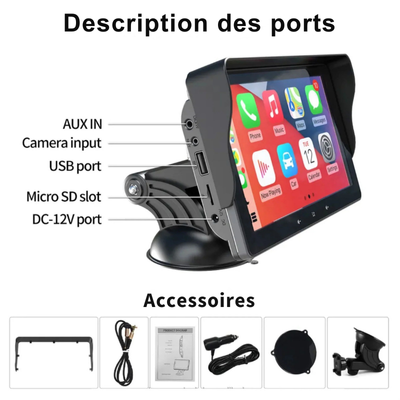
Simply plug the CarPlay unit into your dashboard, turn it on, and it connects directly to your smartphone.
In less than 2 minutes, your old screen becomes a full CarPlay system, with Bluetooth, GPS, music, calls, and messages ,all without tools or professional installation.


Built-in Multimedia Platform
Turn your car into a complete entertainment hub: Netflix, YouTube, Spotify, GPS, calls, and much more.
With CarPlay, enjoy a connected and immersive experience on every trip.

Enhanced Safety & Visibility
The backup camera gives you a clear, wide-angle view of the rear of your vehicle, for precise, stress-free parking.
It records every trip to provide reliable, time-stamped evidence in case of an incident , a key asset for insurance claims.
Compact and easy to install, it quickly becomes your best daily safety ally.
Shop with confidence
FAQ — Carplay & Android auto
How do I install the CarTech CarPlay?
How do I install the CarTech CarPlay?
Installation is very simple: just plug the device into the car’s cigarette lighter socket, mount it on the dashboard using the included adhesive, then connect your smartphone. No vehicle disassembly is required.
Is CarTech compatible with all phones?
Is CarTech compatible with all phones?
Yes.
How does the included backup camera work?
How does the included backup camera work?
The wired rear camera connects directly to the CarTech via the included cable. It provides a clear, wide-angle view to make parking easier and records your trips to provide reliable evidence in case of an incident.
Does the sound play through my car speakers?
Does the sound play through my car speakers?
Yes. CarTech automatically connects to your car’s speakers via Bluetooth or an AUX cable (depending on your vehicle) for optimal audio quality.